Saturday, 16 April 2016

Understanding Inheritance in Entity Framework

Inheritance in the Entity Framework is similar to inheritance for classes in C#. In Entity Framework, you can map an inheritance hierarchy to single or multiple database tables based on your requirements. In this article, you will learn how to map your inheritance hierarchy to database tables in SQL Server.


Types of inheritance in Entity Framework


Entity Framework supports three types of inheritances as given below-


  1. Table-per-Hierarchy (TPH)


    The TPH inheritance states that all entities, in a hierarchy of entities, are mapped to a single table in storage schema. It means, there is only one table in database and different Entity types in Entity model that inherits from a base Entity are mapped to that table.
    Table-per-Hierarchy (TPH)

    C# Implementation Code for TPH


    1. public class Course

    2. {

    3. [Key]

    4. public int CourseId { get; set; }

    5. public string Name { get; set; }

    6. public string Details { get; set; }

    7. public string Trainer { get; set; }

    8. }

    9.  

    10. public class OnlineCourse : Course

    11. {

    12. public string URL { get; set; }

    13. }

    14.  

    15. public class OfflineCourse : Course

    16. {

    17. public string Address { get; set; }

    18. }

    Entity Framework Code First Mapping for TPH


    1. modelBuilder.Entity<Course>()

    2. .Map<OnlineCourse >(m => m.Requires("Type").HasValue("OnlineCourse "))

    3. .Map<OfflineCourse >(m => m.Requires("Type").HasValue("OfflineCourse "));

    Note


    By default, Entity Framework supports TPH inheritance, if you don't define any mapping details for your inheritance hierarchy.


  2. Table-per-Concrete-Type (TPC)


    The TPC inheritance states that each concrete class (a class which can be instantiated) in the hierarchy of entities is mapped to a separate table in storage schema. It means, there is separate table in database to maintain data for each derived entity type.
    Table-per-Concrete-Type (TPC)

    C# Implementation Code for TPC


    1. public abstract class Course //abstract class

    2. {

    3. [Key]

    4. public int CourseId { get; set; }

    5. public string Name { get; set; }

    6. public string Details { get; set; }

    7. public string Trainer { get; set; }

    8. }

    9.  

    10. public class OnlineCourse : Course //concrete class

    11. {

    12. public string URL { get; set; }

    13. }

    14.  

    15. public class OfflineCourse : Course //concrete class

    16. {

    17. public string Address { get; set; }

    18. }

    Entity Framework Code First Mapping for TPC


    1. modelBuilder.Entity<OnlineCourse >().Map(m =>

    2. {

    3. m.MapInheritedProperties();

    4. m.ToTable("OnlineCourse ");

    5. });

    6.  

    7. modelBuilder.Entity<OfflineCourse >().Map(m =>

    8. {

    9. m.MapInheritedProperties();

    10. m.ToTable("OfflineCourse ");

    11. });

    Note


    The TPC inheritance is commonly used to inherit basic features.


  3. Table-per-Type (TPT)


    The TPT inheritance states that each entity in the hierarchy of entities is mapped to a separate table in storage schema. It means, there is separate table in database to maintain data for each Entity Type.
    Table-per-Type (TPT)

    C# Implementation Code for TPT


    1. public class Course

    2. {

    3. [Key]

    4. public int CourseId { get; set; }

    5. public string Name { get; set; }

    6. public string Details { get; set; }

    7. public string Trainer { get; set; }

    8. }

    9.  

    10. public class OnlineCourse : Course

    11. {

    12. public string URL { get; set; }

    13. }

    14.  

    15. public class OfflineCourse : Course

    16. {

    17. public string Address { get; set; }

    18. }

    Entity Framework Code First Mapping for TPT


    1. modelBuilder.Entity<Course>().ToTable("Course");

    2. modelBuilder.Entity<OnlineCourse >().ToTable("OnlineCourse ");

    3. modelBuilder.Entity<OfflineCourse >().ToTable("OfflineCourse ");

    Note


    TPH inheritance patterns generally deliver better performance in the Entity Framework than TPT inheritance patterns, because TPT patterns can result in complex join queries.

What do you think?

I hope you will enjoy the tips while programming with Entity Framework. I would like to have feedback from my blog readers. Your valuable feedback, question, or comments about this article are always welcome

What is MongoDB and Why to use it?

MongoDB is one of the most popular open-source NoSQL database written in C++. As of February 2015, MongoDB is the fourth most popular database management system. It was developed by a company 10gen which is now known as MongoDB Inc.


MongoDB is a document-oriented database which stores data in JSON-like documents with dynamic schema. It means you can store your records without worrying about the data structure such as the number of fields or types of fields to store values. MongoDB documents are similar to JSON objects.

Platform and Language Support


MongoDb is a cross-platform NoSQL database which can run on Windows, Linux and Mac etc. It supports most popular programming languages like C#, Java, Php, Javascript etc. and development environments as well.

Comparing SQL DB schema with Mongo DB schema


SQL DB

MongoDB


Table

Collection


Row

Document


Column

Field


Joins

Embedded documents, linking


Primary Key

Primary Key (Default key _id provided by mongodb itself)


Why Mongo DB


As you know, RDMS stores data in tables format and uses structured query language (SQL) to query database. RDBMS also has pre-defined database schema based on the requirements and a set of rules to define the relationships between fields in tables.

But MongoDB stores data in documents in-spite of tables. You can change the structure of records (which is called as documents in MongoDB) simply by adding new fields or deleting existing ones. This ability of MongoDB help you to represent hierarchical relationships, to store arrays, and other more complex structures easily. MongoDB provides high performance, high availability, easy scalability and out-of-the-box replication and auto-sharding.
What do you think?

I hope you will enjoy MongoDB for storing your data. I would like to have feedback from my blog readers. Your valuable feedback, question, or comments about this article are always welcome.

What is Code-First

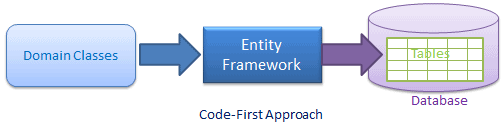
Entity Framework introduced Code-First approach from Entity Framework 4.1. Code-First is mainly useful in Domain Driven Design. With the Code-First approach, you can focus on the domain design and start creating classes as per your domain requirement rather than design your database first and then create the classes which match your database design. Code-First APIs will create the database on the fly based on your entity classes and configuration.


code-first in entity framework
As a developer, you first start by writing C# or VB.net classes and context class. When you run the application, Code First APIs will create the new database (if it does not exist yet) and map your classes with the database using default code-first conventions. You can also configure your domain classes to override default conventions to map with database tables using DataAnnotation attributes or fluent API.

The basic workflow would be:

Write application domain classes and context class→ configure domain classes for additional mapping requirements → Hit F5 to run the application → Code First API creates new database or map existing database with domain classes → Seed default/test data into the database → Finally launches the application

Friday, 15 April 2016

What is Node.js and Why to use it?

Node.js is a server side JavaScript environment for developing web applications like as ASP.NET, JSP, Php etc. It is an open-source and cross-platform framework based on Google's V8 JavaScript Engine.

Node.js was developed by Ryan Dahl and other developers working at Joyent. It was first released in 2009 supporting only Linux. In 2011, windows version was released.

It is used to build fast and scalable network applications as well as data-intensive real-time web applications. All versions of Node.js are starting from 0.1.0 releases to 0.1.x, 0.2.x, 0.3.x, 0.4.x, 0.5.x, 0.6.x, 0.7.x, 0.8.x, 0.9.x, 0.10.x, 0.11.x, and 0.12.x. Before merging of Node.js and io.js, it’s last versions was Node.js v0.12.9.

V8 JavaScript Engine


V8 is written in C++ language and implements ECMA Script (ES5). V8 is used in Google Chrome and can be run standalone or can be embedded into any C++ application.

V8 uses just-in-time compilation (JIT) to execute javascript code. V8 can run on Windows XP, Vista, Windows7+, Mac OS X 10.5+, and Linux OS. The first version of the V8 engine was released with the first version of Chrome on September 2, 2008.

According to Wikipedia, V8 compiles JavaScript to native machine code (IA-32, x86-64, ARM, or MIPS ISAs) before executing it, instead of more traditional techniques such as interpreting byte code or compiling the whole program to machine code and executing it from a file system.

Why Node.js?


As you know, JavaScript is an event-based language, so if you are using JavaScript at server side then anything happens on the server will trigger a non-blocking event. For example, each new connection request will fire an event, received data from a form will fire a data-received event, requested data from the database will fire data-requested event.

It means a Node.js site will never lock up and can support thousands of concurrent users. In this way Node.js plays the role of web server like Apache and IIS. Actually, Node.js allows you to process new requests without waiting for back-end services to respond.

Node.js is also great for mobile applications, which typically rely on an API server to service requests from thousands of devices at once.

Node.js Application Area


Node.js can be used to create following types of applications.

  1. E-Commerce Web Applications

  2. Social Media Applications

  3. Proxy Server

  4. Real-time Services

  5. Real-time data Applications like Multiplayer Games, Stock Trading, Chat App etc.

  6. Data Streaming Applications

  7. Network Applications

  8. High Concurrency Applications

  9. File Uploading Tools

  10. Process Monitoring Tools

  11. HTTP Web Server

Who use Node.js


  1. Walmart

  2. E-bay

  3. PayPal

  4. Microsoft

  5. LinkedIn

  6. Yahoo

  7. Google

  8. SAP

  9. IBM

  10. Strong Loop

  11. Dropbox

Node.js Platform Support


Node.js supports following platforms:

  1. Linux

  2. Windows

  3. Mac OS X

  4. SunOS

IDE for Node.js Development


  1. Visual Studio 2013, 2015 or higher

  2. Visual Studio Code

  3. Atom

  4. Node Eclipse

  5. WebStorm

  6. Sublime Text

Note


  1. Node.js is not a JavaScript library, but it is a platform to execute JavaScript on server side.

  2. Node app can not be deploy on your existing hosts like shared web hosting etc.

  3. You can use VPS and dedicated servers to install node and run your app.

  4. The easiest way to deploy your node app is to use a scalable service like Heroku, which is completely free and you only need to pay when you are using more resources.

What do you think?

I hope, now you have better understanding about Node.js. I would like to have feedback from my blog readers. Your valuable feedback, question, or comments about this article are always welcome.

Service vs provider vs factory


Services


Syntax: module.service( 'serviceName', function );
Result: When declaring serviceName as an injectable argument you will be provided with an instance of the function. In other words new FunctionYouPassedToService().

Factories


Syntax: module.factory( 'factoryName', function );
Result: When declaring factoryName as an injectable argument you will be provided with the value that is returned by invoking the function reference passed to module.factory.

Providers


Syntax: module.provider( 'providerName', function );
Result: When declaring providerName as an injectable argument you will be provided with (new ProviderFunction()).$get(). The constructor function is instantiated before the $get method is called - ProviderFunction is the function reference passed to module.provider.

Providers have the advantage that they can be configured during the module configuration phase.

See here for the provided code.

Here's a great further explanation by Misko:
provide.value('a', 123);

function Controller(a) {
expect
(a).toEqual(123);
}

In this case the injector simply returns the value as is. But what if you want to compute the value? Then use a factory
provide.factory('b', function(a) {
return a*2;
});

function Controller(b) {
expect
(b).toEqual(246);
}

So factory is a function which is responsible for creating the value. Notice that the factory function can ask for other dependencies.

But what if you want to be more OO and have a class called Greeter?
function Greeter(a) {
this.greet = function() {
return 'Hello ' + a;
}
}

Then to instantiate you would have to write
provide.factory('greeter', function(a) {
return new Greeter(a);
});

Then we could ask for 'greeter' in controller like this
function Controller(greeter) {
expect
(greeter instanceof Greeter).toBe(true);
expect
(greeter.greet()).toEqual('Hello 123');
}

But that is way too wordy. A shorter way to write this would be provider.service('greeter', Greeter);

But what if we wanted to configure the Greeter class before the injection? Then we could write
provide.provider('greeter2', function() {
var salutation = 'Hello';
this.setSalutation = function(s) {
salutation
= s;
}

function Greeter(a) {
this.greet = function() {
return salutation + ' ' + a;
}
}

this.$get = function(a) {
return new Greeter(a);
};
});

Then we can do this:
angular.module('abc', []).config(function(greeter2Provider) {
greeter2Provider
.setSalutation('Halo');
});

function Controller(greeter2) {
expect
(greeter2.greet()).toEqual('Halo 123');
}

As a side note, service, factory, and value are all derived from provider.
provider.service = function(name, Class) {
provider
.provide(name, function() {
this.$get = function($injector) {
return $injector.instantiate(Class);
};
});
}

provider
.factory = function(name, factory) {
provider
.provide(name, function() {
this.$get = function($injector) {
return $injector.invoke(factory);
};
});
}

provider
.value = function(name, value) {
provider
.factory(name, function() {
return value;
});
};

Understanding AngularJS scope life-cycle

Scope data goes through a life cycle when the angular app is loaded into the browser. Understanding the scope life cycle will help you to understand the interaction between scope and other AngularJS components.

The scope data goes through the following life cycle phases:


  1. Creation


    This phase initialized the scope. The root scope is created by the $injector when the application is bootstrapped. During template linking, some directives create new child scopes.

    A digest loop is also created in this phase that interacts with the browser event loop. This digest loop is responsible to update DOM elements with the changes made to the model as well as executing any registered watcher functions.


  2. Watcher registration


    This phase registers watches for values on the scope that are represented in the template. These watches propagate model changes automatically to the DOM elements.

    You can also register your own watch functions on a scope value by using the $watch() function.


  3. Model mutation


    This phase occurs when data in the scope changes. When you make the changes in your angular app code, the scope function $apply() updates the model and calls the $digest() function to update the DOM elements and registered watches.

    When you do the changes to scope inside your angular code like within controllers or services, angular internally call $apply() function for you. But when you do the changes to the scope outside the angular code, you have to call $apply() function explicitly on the scope to force the model and DOM to be updated correctly.


  4. Mutation observation


    This phase occurs when the $digest() function is executed by the digest loop at the end of $apply() call. When $digest() function executes, it evaluates all watches for model changes. If a value has been changed, $digest() calls the $watch listener and updates the DOM elements.


  5. Scope destruction


    This phase occurs when child scopes are no longer needed and these scopes are removed from the browser’s memory by using $destroy() function. It is the responsibility of the child scope creator to destroy them via scope.$destroy() API.

    This stop propagation of $digest calls into the child scopes and allow the memory to be reclaimed by the browser garbage collector.

What do you think?


I hope you will enjoy the AngularJS scopes while developing your app with AngularJS. I would like to have feedback from my blog readers. Your valuable feedback, question, or comments about this article are always welcome.

Introduction to N-hibernate

NHibernate is a .NET based object persistence library for relational databases. Basically it is a framework that allows us to talk to a relational database in an object-oriented way. We can store/persist objects in a database and load those objects from the database later on. NHibernate automatically translates our programming language syntax to a language that the database understands. NHibernate also generates the required SQL statements to fetch, insert, update and delete data.

If we use NHibernate, then we never have to write any code that deals with the fact that there is an impedance mismatch between the way we develop applications in .NET and how a database works. NHibernate has abstracted away this mismatch for us.

What is O/RM?


O/RM is an acronym that stands for object/relational mapping. In a nutshell, an O/RM framework is used to persist model objects in a relational database and retrieve them. It uses metadata information to interface with the database. This way, your data-layer code knows nothing about the database structure; the O/RM tool becomes middleware that completely hides the complexity.

The heart of an O/RM is the mapping. Basically mapping technique binds the object and relational worlds. By mapping, we express how a class and its properties are related to one or more tables in the database. This information is used by the O/RM tool engine to build SQL code to retrieve data and transforms it into objects. The mapping information is generally expressed as an XML file. As an alternative, some O/RM tools use attributes on the classes and their properties to maintain mapping data.

Why NHibernate?


In the past, we carefully hand-crafted our data access layers for the applications we wrote. We spent as much as 50% or more of our overall time to implement and maintain this data layer.It was not a very challenging task though, and a lot of repetitive coding was involved.

As we were not the only developers facing the problem of writing the data access code,some people started to write and publish a framework that would solve this problem. This was the birth of the ORM frameworks such as NHibernate. Nowadays, accessing relational data from an object-oriented application is a solved problem

Thus, writing your own data layer is a waste of time. Somebody even used a much more pronounced phrase to pinpoint this fact, "Writing your own data access layer is like stealing money from your client".

Installing NHibernate


NHibernate is an open source project (OSS). Thus, the code and/or the binaries are freely available and can be downloaded from SourceForge. Before you can start coding, you must first install NHibernate. The following list presents a couple of blogs that are either mostly dedicated to NHibernate or contain a lot of information around this framework:

  1. The latest version of NHibernate can be downloaded from http://sourceforge.net/projects/nhibernate

  2. NHibernate meta blog at http://nhforge.org/blogs/nhibernate

  3. Fabio Maulo's blog at http://fabiomaulo.blogspot.com Fabio is the leader of the NHibernate project.

  4. James Gregory's blog at http://jagregory.com. James is the leader of the Fluent NHibernate project.

Once you’ve downloaded and installed NHibernate, you’re ready to create a new solution and start using it.

Understanding different types of WCF Contracts

WCF contract specify the service and its operations. WCF has five types of contracts: service contract, operation contract, data contract, message contract and fault contract.


  1. Service Contract


    A service contract defines the operations which are exposed by the service to the outside world. A service contract is the interface of the WCF service and it tells the outside world what the service can do. It may have service-level settings, such as the name of the service and namespace for the service.

    1. [ServiceContract]

    2. interface IMyContract

    3. {

    4. [OperationContract]

    5. string MyMethod();

    6. }

    7.  

    8. class MyService : IMyContract

    9. {

    10. public string MyMethod()

    11. {

    12. return "Hello World";

    13. }

    14. }


  2. Operation Contract


    An operation contract is defined within a service contract. It defines the parameters and return type of an operation. An operation contract can also defines operation-level settings, like as the transaction flow of the op-eration, the directions of the operation (one-way, two-way, or both ways), and fault contract of the operation.

    1. [ServiceContract]

    2. interface IMyContract

    3. {

    4. [FaultContract(typeof(MyFaultContract))]

    5. [OperationContract]

    6. string MyMethod();

    7. }


  3. Data Contract


    A data contract defines the data type of the information that will be exchange be-tween the client and the service. A data contract can be used by an operation contract as a parameter or return type, or it can be used by a message contract to define elements.

    1. [DataContract]

    2. class Person

    3. {

    4. [DataMember]

    5. public string ID;

    6. [DataMember]

    7. public string Name;

    8. }


    9. [ServiceContract]

    10. interface IMyContract

    11. {

    12. [OperationContract]

    13. Person GetPerson(int ID);

    14. }


  4. Message Contract


    When an operation contract required to pass a message as a parameter or return value as a message, the type of this message will be defined as message contract. A message contract defines the elements of the message (like as Message Header, Message Body), as well as the message-related settings, such as the level of message security.

    Message contracts give you complete control over the content of the SOAP header, as well as the structure of the SOAP body.

    1. [ServiceContract]

    2. public interface IRentalService

    3. {

    4. [OperationContract]

    5. double CalPrice(PriceCalculate request);

    6. }

    7.  

    8. [MessageContract]

    9. public class PriceCalculate

    10. {

    11. [MessageHeader]

    12. public MyHeader SoapHeader { get; set; }

    13. [MessageBodyMember]

    14. public PriceCal PriceCalculation { get; set; }

    15. }

    16.  

    17. [DataContract]

    18. public class MyHeader

    19. {

    20. [DataMember]

    21. public string UserID { get; set; }

    22. }

    23.  

    24. [DataContract]

    25. public class PriceCal

    26. {

    27. [DataMember]

    28. public DateTime PickupDateTime { get; set; }

    29. [DataMember]

    30. public DateTime ReturnDateTime { get; set; }

    31. [DataMember]

    32. public string PickupLocation { get; set; }

    33. [DataMember]

    34. public string ReturnLocation { get; set; }

    35. }


  5. Fault Contract


    A fault contract defines errors raised by the service, and how the service handles and propagates errors to its clients. An operation contract can have zero or more fault contracts associated with it.

    1. [ServiceContract]

    2. interface IMyContract

    3. {

    4. [FaultContract(typeof(MyFaultContract1))]

    5. [FaultContract(typeof(MyFaultContract2))]

    6. [OperationContract]

    7. string MyMethod();


    8. [OperationContract]

    9. string MyShow();

    10. }

What do you think?

I hope you will enjoy the tips while programming with WCF. I would like to have feedback from my blog readers. Your valuable feedback, question, or comments about this article are always welcome.

Thursday, 14 April 2016

AngularJS vs jQuery

1. Don't design your page, and then change it with DOMmanipulations


In jQuery, you design a page, and then you make it dynamic. This is because jQuery was designed for augmentation and has grown incredibly from that simple premise.

But in AngularJS, you must start from the ground up with your architecture in mind. Instead of starting by thinking "I have this piece of the DOM and I want to make it do X", you have to start with what you want to accomplish, then go about designing your application, and then finally go about designing your view.

2. Don't augment jQuery with AngularJS


Similarly, don't start with the idea that jQuery does X, Y, and Z, so I'll just add AngularJS on top of that for models and controllers. This is really tempting when you're just starting out, which is why I always recommend that new AngularJS developers don't use jQuery at all, at least until they get used to doing things the "Angular Way".

I've seen many developers here and on the mailing list create these elaborate solutions with jQuery plugins of 150 or 200 lines of code that they then glue into AngularJS with a collection of callbacks and$applys that are confusing and convoluted; but they eventually get it working! The problem is that inmost cases that jQuery plugin could be rewritten in AngularJS in a fraction of the code, where suddenly everything becomes comprehensible and straightforward.

The bottom line is this: when solutioning, first "think in AngularJS"; if you can't think of a solution, ask the community; if after all of that there is no easy solution, then feel free to reach for the jQuery. But don't let jQuery become a crutch or you'll never master AngularJS.

3. Always think in terms of architecture


First know that single-page applications are applications. They're not webpages. So we need to think like a server-side developer in addition to thinking like a client-side developer. We have to think about how to divide our application into individual, extensible, testable components.

So then how do you do that? How do you "think in AngularJS"? Here are some general principles, contrasted with jQuery.

The view is the "official record"


In jQuery, we programmatically change the view. We could have a dropdown menu defined as a ullike so:
<ul class="main-menu">
    <li class="active">
        <a href="#/home">Home</a>
    </li>
    <li>
        <a href="#/menu1">Menu 1</a>
        <ul>
            <li><a href="#/sm1">Submenu 1</a></li>
            <li><a href="#/sm2">Submenu 2</a></li>
            <li><a href="#/sm3">Submenu 3</a></li>
        </ul>
    </li>
    <li>
        <a href="#/home">Menu 2</a>
    </li>
</ul>

In jQuery, in our application logic, we would activate it with something like:
$('.main-menu').dropdownMenu();

When we just look at the view, it's not immediately obvious that there is any functionality here. For small applications, that's fine. But for non-trivial applications, things quickly get confusing and hard to maintain.

In AngularJS, though, the view is the official record of view-based functionality. Our ul declaration would look like this instead:
<ul class="main-menu" dropdown-menu>
    ...</ul>

These two do the same thing, but in the AngularJS version anyone looking at the template knows what's supposed to happen. Whenever a new member of the development team comes on board, she can look at this and then know that there is a directive called dropdownMenu operating on it; she doesn't need to intuit the right answer or sift through any code. The view told us what was supposed to happen. Much cleaner.

Developers new to AngularJS often ask a question like: how do I find all links of a specific kind and add a directive onto them. The developer is always flabbergasted when we reply: you don't. But the reason you don't do that is that this is like half-jQuery, half-AngularJS, and no good. The problem here is that the developer is trying to "do jQuery" in the context of AngularJS. That's never going to work well. The view is the official record. Outside of a directive (more on this below), you never, ever, neverchange the DOM. And directives are applied in the view, so intent is clear.

Remember: don't design, and then mark up. You must architect, and then design.

Data binding


This is by far one of the most awesome features of AngularJS and cuts out a lot of the need to do the kinds of DOM manipulations I mentioned in the previous section. AngularJS will automatically update your view so you don't have to! In jQuery, we respond to events and then update content. Something like:
$.ajax({
  url: '/myEndpoint.json',
  success: function ( data, status ) {
    $('ul#log').append('<li>Data Received!</li>');
  }
});

For a view that looks like this:
<ul class="messages" id="log">
</ul>

Apart from mixing concerns, we also have the same problems of signifying intent that I mentioned before. But more importantly, we had to manually reference and update a DOM node. And if we want to delete a log entry, we have to code against the DOM for that too. How do we test the logic apart from the DOM? And what if we want to change the presentation?

This a little messy and a trifle frail. But in AngularJS, we can do this:
$http( '/myEndpoint.json' ).then( function ( response ) {
    $scope.log.push( { msg: 'Data Received!' } );
});

And our view can look like this:
<ul class="messages">
    <li ng-repeat="entry in log">{{ entry.msg }}</li>
</ul>

But for that matter, our view could look like this:
class="messages">

class="alert" ng-repeat="entry in log"> {{ entry.msg }}

</div>

And now instead of using an unordered list, we're using Bootstrap alert boxes. And we never had to change the controller code! But more importantly, no matter where or how the log gets updated, the view will change too. Automatically. Neat!

Though I didn't show it here, the data binding is two-way. So those log messages could also be editable in the view just by doing this: <input ng-model="entry.msg" />. And there was much rejoicing.

Distinct model layer


In jQuery, the DOM is kind of like the model. But in AngularJS, we have a separate model layer that we can manage in any way we want, completely independently from the view. This helps for the above data binding, maintains separation of concerns, and introduces far greater testability. Other answers mentioned this point, so I'll just leave it at that.

Separation of concerns


And all of the above tie into this over-arching theme: keep your concerns separate. Your view acts as the official record of what is supposed to happen (for the most part); your model represents your data; you have a service layer to perform reusable tasks; you do DOM manipulation and augment your view with directives; and you glue it all together with controllers. This was also mentioned in other answers, and the only thing I would add pertains to testability, which I discuss in another section below.

Dependency injection


To help us out with separation of concerns is dependency injection (DI). If you come from a server-side language (from Java to PHP) you're probably familiar with this concept already, but if you're a client-side guy coming from jQuery, this concept can seem anything from silly to superfluous to hipster. But it's not. :-)

From a broad perspective, DI means that you can declare components very freely and then from any other component, just ask for an instance of it and it will be granted. You don't have to know about loading order, or file locations, or anything like that. The power may not immediately be visible, but I'll provide just one (common) example: testing.

Let's say in our application, we require a service that implements server-side storage through a RESTAPI and, depending on application state, local storage as well. When running tests on our controllers, we don't want to have to communicate with the server - we're testing the controller, after all. We can just add a mock service of the same name as our original component, and the injector will ensure that our controller gets the fake one automatically - our controller doesn't and needn't know the difference.

Speaking of testing...

4. Test-driven development - always


This is really part of section 3 on architecture, but it's so important that I'm putting it as its own top-level section.

Out of all of the many jQuery plugins you've seen, used, or written, how many of them had an accompanying test suite? Not very many because jQuery isn't very amenable to that. But AngularJS is.

In jQuery, the only way to test is often to create the component independently with a sample/demo page against which our tests can perform DOM manipulation. So then we have to develop a component separately and then integrate it into our application. How inconvenient! So much of the time, when developing with jQuery, we opt for iterative instead of test-driven development. And who could blame us?

But because we have separation of concerns, we can do test-driven development iteratively in AngularJS! For example, let's say we want a super-simple directive to indicate in our menu what our current route is. We can declare what we want in the view of our application:
<a href="/hello" when-active>Hello</a>

Okay, now we can write a test for the non-existent when-active directive:
it( 'should add "active" when the route changes', inject(function() {
    var elm = $compile( '<a href="/hello" when-active>Hello</a>' )( $scope );

    $location.path('/not-matching');
    expect( elm.hasClass('active') ).toBeFalsey();

    $location.path( '/hello' );
    expect( elm.hasClass('active') ).toBeTruthy();
}));

And when we run our test, we can confirm that it fails. Only now should we create our directive:
.directive( 'whenActive', function ( $location ) {
    return {
        scope: true,
        link: function ( scope, element, attrs ) {
            scope.$on( '$routeChangeSuccess', function () {
                if ( $location.path() == element.attr( 'href' ) ) {
                    element.addClass( 'active' );
                }
                else {
                    element.removeClass( 'active' );
                }
            });
        }
    };
});

Our test now passes and our menu performs as requested. Our development is both iterative andtest-driven. Wicked-cool.

5. Conceptually, directives are not packaged jQuery


You'll often hear "only do DOM manipulation in a directive". This is a necessity. Treat it with due deference!

But let's dive a little deeper...

Some directives just decorate what's already in the view (think ngClass) and therefore sometimes do DOM manipulation straight away and then are basically done. But if a directive is like a "widget" and has a template, it should also respect separation of concerns. That is, the template too should remain largely independent from its implementation in the link and controller functions.

AngularJS comes with an entire set of tools to make this very easy; with ngClass we can dynamically update the class; ngModel allows two-way data binding; ngShow and ngHideprogrammatically show or hide an element; and many more - including the ones we write ourselves. In other words, we can do all kinds of awesomeness without DOM manipulation. The less DOM manipulation, the easier directives are to test, the easier they are to style, the easier they are to change in the future, and the more re-usable and distributable they are.

I see lots of developers new to AngularJS using directives as the place to throw a bunch of jQuery. In other words, they think "since I can't do DOM manipulation in the controller, I'll take that code put it in a directive". While that certainly is much better, it's often still wrong.

Think of the logger we programmed in section 3. Even if we put that in a directive, we still want to do it the "Angular Way". It still doesn't take any DOM manipulation! There are lots of times when DOM manipulation is necessary, but it's a lot rarer than you think! Before doing DOM manipulationanywhere in your application, ask yourself if you really need to. There might be a better way.

Here's a quick example that shows the pattern I see most frequently. We want a toggleable button. (Note: this example is a little contrived and a skosh verbose to represent more complicated cases that are solved in exactly the same way.)
.directive( 'myDirective', function () {
    return {
        template: '<a class="btn">Toggle me!</a>',
        link: function ( scope, element, attrs ) {
            var on = false;

            $(element).click( function () {
                on = !on;
                $(element).toggleClass('active', on);
            });
        }
    };
});

There are a few things wrong with this:

  1. First, jQuery was never necessary. There's nothing we did here that needed jQuery at all!

  2. Second, even if we already have jQuery on our page, there's no reason to use it here; we can simply use angular.element and our component will still work when dropped into a project that doesn't have jQuery.

  3. Third, even assuming jQuery was required for this directive to work, jqLite (angular.element) will always use jQuery if it was loaded! So we needn't use the $ - we can just use angular.element.

  4. Fourth, closely related to the third, is that jqLite elements needn't be wrapped in $ - the elementthat is passed to the link function would already be a jQuery element!

  5. And fifth, which we've mentioned in previous sections, why are we mixing template stuff into our logic?

This directive can be rewritten (even for very complicated cases!) much more simply like so:
.directive( 'myDirective', function () {
    return {
        scope: true,
        template: '<a class="btn" ng-class="{active: on}" ng-click="toggle()">Toggle me!</a>',
        link: function ( scope, element, attrs ) {
            scope.on = false;

            scope.toggle = function () {
                scope.on = !scope.on;
            };
        }
    };
});

Again, the template stuff is in the template, so you (or your users) can easily swap it out for one that meets any style necessary, and the logic never had to be touched. Reusability - boom!

And there are still all those other benefits, like testing - it's easy! No matter what's in the template, the directive's internal API is never touched, so refactoring is easy. You can change the template as much as you want without touching the directive. And no matter what you change, your tests still pass.

w00t!

So if directives aren't just collections of jQuery-like functions, what are they? Directives are actuallyextensions of HTML. If HTML doesn't do something you need it to do, you write a directive to do it for you, and then use it just as if it was part of HTML.

Put another way, if AngularJS doesn't do something out of the box, think how the team would accomplish it to fit right in with ngClick, ngClass, et al.

Summary


Don't even use jQuery. Don't even include it. It will hold you back. And when you come to a problem that you think you know how to solve in jQuery already, before you reach for the $, try to think about how to do it within the confines the AngularJS. If you don't know, ask! 19 times out of 20, the best way to do it doesn't need jQuery and to try to solve it with jQuery results in more work for you.

Understanding Cloud Computing and Windows Azure

Cloud computing is the delivery of computing as a service rather than a product. It is completely based on the Internet. Cloud Computing provides on-demand hardware (like Server), storage resources, services hosting and services management environment, and other devices as a utility or resource over a network, rather than having your local servers or personal devices to handle manage your services and applications.

CloudComputingBasics

Cloud


A Cloud is just a combination of hardware (computer, other devices), networks, storage, services, and interfaces that helps in delivering computing as a service. It has mainly three users - end user, business management user, and cloud service provider.

The end user uses the services provided by the cloud. The business management user takes care of the data and the services provided by the cloud. The cloud service provider is responsible for the maintenance of the IT assets of the cloud.

Cloud Service


A cloud service allows you to build cloud applications without installing it on the computer. It reduces the maintenance and support of the application as compared to the applications which are not developed by using the cloud service. The different kinds of users can use the application from the cloud service.

Windows Azure


Windows Azure is an open and flexible cloud platform that serves as the development, data storing, service hosting and service management environment. Windows Azure provides developers with on-demand compute and storage to host, scale, and manage web applications on the internet through Microsoft datacenters.

Advantage of Windows Azure


There are following advantages of Windows Azure-

  1. Reduce the effort and costs of IT management.

  2. Reduce costs of building and extending on-premises resources.

  3. Respond quickly to changes in your business and customer needs.

  4. Choose an on-premises or off-premises deployment model that best suits your needs.

  5. Scale your IT resources up and down based on your needs.

  6. Consume computing resources ONLY when the needs arise.

  7. Remove the need to manage hardware.

  8. Use your existing development skills to build cloud applications.

  9. Consistent development and management experience across on-premises and the cloud.

What do you think?

I hope you will enjoy the tips while working with Windows Azure. I would like to have feedback from my blog readers. Your valuable feedback, question, or comments about this article are always welcome.

Wednesday, 13 April 2016

Understanding $watch(), $watchgroup() and $watchCollection() methods ofscope

Angular uses $watch APIs to observe model changes on the scope. Angular registered watchers for each variable on scope to observe the change in its value. If the value, of variable on scope is changed then the view gets updated automatically. $watch APIs has following methods to observe model changes on the scope.


$watch


This function is used to observe changes in a variable on the $scope. It accepts three parameters: expression, listener and equality object, where listener and equality object are optional parameters.

  1. $watch(watchExpression, listener, [objectEquality])

Here, watchExpression is the expression in the scope to watch. This expression is called on every $digest() and returns the value that is being watched.

The listener defines a function that is called when the value of the watchExpression changes to a new value. If the watchExpression is not changed then listener will not be called.

The objectEquality is a boolean type which is used for comparing the objects for equality using angular.equals instead of comparing for reference equality.


  1. scope.name = 'shailendra';

  2. scope.counter = 0;

  3.  

  4. scope.$watch('name', function (newVal, oldVal) {

  5. scope.counter = scope.counter + 1;

  6. });


$watchgroup


This function is introduced in Angular1.3. This works the same as $watch() function except that the first parameter is an array of expressions to watch.

  1. $watchGroup(watchExpression, listener)

The listener is passed as an array with the new and old values for the watched variables. The listener is called whenever any expression in the watchExpressions array changes.


  1. $scope.teamScore = 0;

  2. $scope.time = 0;

  3. $scope.$watchGroup(['teamScore', 'time'], function(newVal, oldVal) {

  4. if(newVal[0] > 20){

  5. $scope.matchStatus = 'win';

  6. }

  7. else if (newVal[1] > 60){

  8. $scope.matchStatus = 'times up';

  9. });


$watchCollection


This function is used to watch the properties of an object and fires whenever any of the properties change. It takes anobject as the first parameter and watches the properties of the object.

  1. $watchCollection(obj, listener)

The listener is called whenever anything within the obj has been changed.


  1. $scope.names = ['shailendra', 'deepak', 'mohit', 'kapil'];

  2. $scope.dataCount = 4;

  3.  

  4. $scope.$watchCollection('names', function (newVal, oldVal) {

  5. $scope.dataCount = newVal.length;

  6. });


What do you think?


I hope you will enjoy the watchers in AngularJS while developing your app with AngularJS. I would like to have feedback from my blog readers. Your valuable feedback, question, or comments about this article are always welcome.

Tuesday, 12 April 2016

Understanding ng-if, ng-switch and ng-repeat directives

AngularJS provides you ng-if, ng-switch directives to display HTML elements based on conditions or cases. ng-repeat directive is used to generate HTML from a collection of items.


ng-if


This directive can add / remove HTML elements from the DOM based on an expression. If the expression is true, it add HTML elements to DOM, otherwise HTML elements are removed from the DOM.


  1. ng-controller="MyCtrl">


  2. ng-if="data.isVisible">ng-if Visible

  3. </div>

  4.  


  5. var app = angular.module("app", []);

  6. app.controller("MyCtrl", function ($scope) {

  7. $scope.data = {};

  8. $scope.data.isVisible = true;

  9. });


ng-switch


This directive can add / remove HTML elements from the DOM conditionally based on scope expression.


  1. ng-controller="MyCtrl">


  2. ng-switch on="data.case">


  3. ng-switch-when="1">Shown when case is 1


  4. ng-switch-when="2">Shown when case is 2


  5. ng-switch-default>Shown when case is anything else than 1 and 2

  6. </div>

  7. </div>

  8.  


  9. var app = angular.module("app", []);

  10. app.controller("MyCtrl", function ($scope) {

  11. $scope.data = {};

  12. $scope.data.case = true;

  13. });


ng-repeat


This directive is used to iterate over a collection of items and generate HTML from it.


  1. ng-controller="MyCtrl">


  2. ng-repeat="name in names">

  3. {{ name }}


  4.  


  5. var app = angular.module("app", []);

  6. app.controller("MyCtrl", function ($scope) {

  7. $scope.names = ['Shailendra', 'Deepak', 'Kamal'];

  8. });


What do you think?


I hope you will enjoy the ng-if, ng-switch and ng-repeat directives in AngularJS while developing your app with AngularJS. I would like to have feedback from my blog readers. Your valuable feedback, question, or comments about this article are always welcome.